clicksor

Showing posts with label startmenu. Show all posts

Monday, 27 February 2012

To disable RUN option from start menu using registry


It shows how to disable RUN option from start menu using registry
Keywords: RUN, startmenu, desktop, registry, regedit.

Steps to disable RUN option from start menu

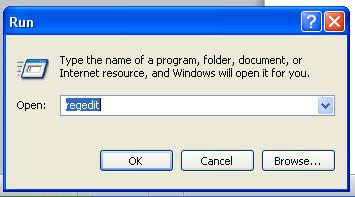
Step 1: Click on Start button and type regedit in RUN option and continue.


Step 2: Then locate the location: HKey_Current_User \ Software\ Microsoft \Windows \ Current Version \ Policies \ Explorer

Step 3: Now right click on the right side of the panel and create a DWORD and name it NoFile or NoRun


Step 4: Then change the value to 1


Step 5: Now restart your system for the changes to take place.


Tuesday, 14 February 2012

To prevent changes to Start Menu using registry.


It shows how to prevent changes to start menu using Registry
Keywords: Registry, regedit, StartMenu.

Steps to prevent Start Menu changes.

Step 1: Click Start Menu and type regedit in RUN option and continue. 


Step 2: Then locate: HKEY_CURRENT_USER \ Software \ Microsoft \ Windows \ CurrentVersion \ Policies \ Explorer

Step 3: Create a DWORD called NoChangeStartMenu (right click on the right side panel, select new and click DWORD)

 
Step 4: Now change its value to 1

 
Step 5: Now restart your system for the changes to take place.
Note: If you like this post, please post a comment and be a follower.